What Are Claude Managed Agents? Everything You Need to Know
Juan Carlos Quintero, Founder
Yesterday, Anthropic launched Claude Managed Agents in public beta and the potential for building powerful autonomous agents is huge
If you've been following the AI agent space, you know that building agents is one thing, but keeping them running reliably in production is a whole different challenge
Claude Managed Agents is Anthropic's answer to that problem
Let's break down what it is, how it works, and how it compares to other platforms and tools you might already be using
What Are Claude Managed Agents?
Claude Managed Agents is a pre-built, configurable agent service that runs on Anthropic's cloud infrastructure. Instead of building your own agent loop, tool execution layer, and container setup from scratch, you get a fully managed environment where Claude can:
- Read and write files
- Run shell commands
- Browse the web and fetch content
- Execute code securely
- Connect to external services via MCP servers
Think of it this way: if the Messages API gives you direct access to Claude's brain, Managed Agents gives you the brain plus the hands, the workspace, and the infrastructure to let it work autonomously
The service handles prompt caching, context compaction, and other performance optimizations behind the scenes, so you can focus on what your agent should do, not how to keep it running
Key takeaway: it is as a serverless agent runtime. You define your agent's configuration, and Anthropic takes care of the infrastructure to run it at scale, with built-in tools and integrations
How Does It Work?
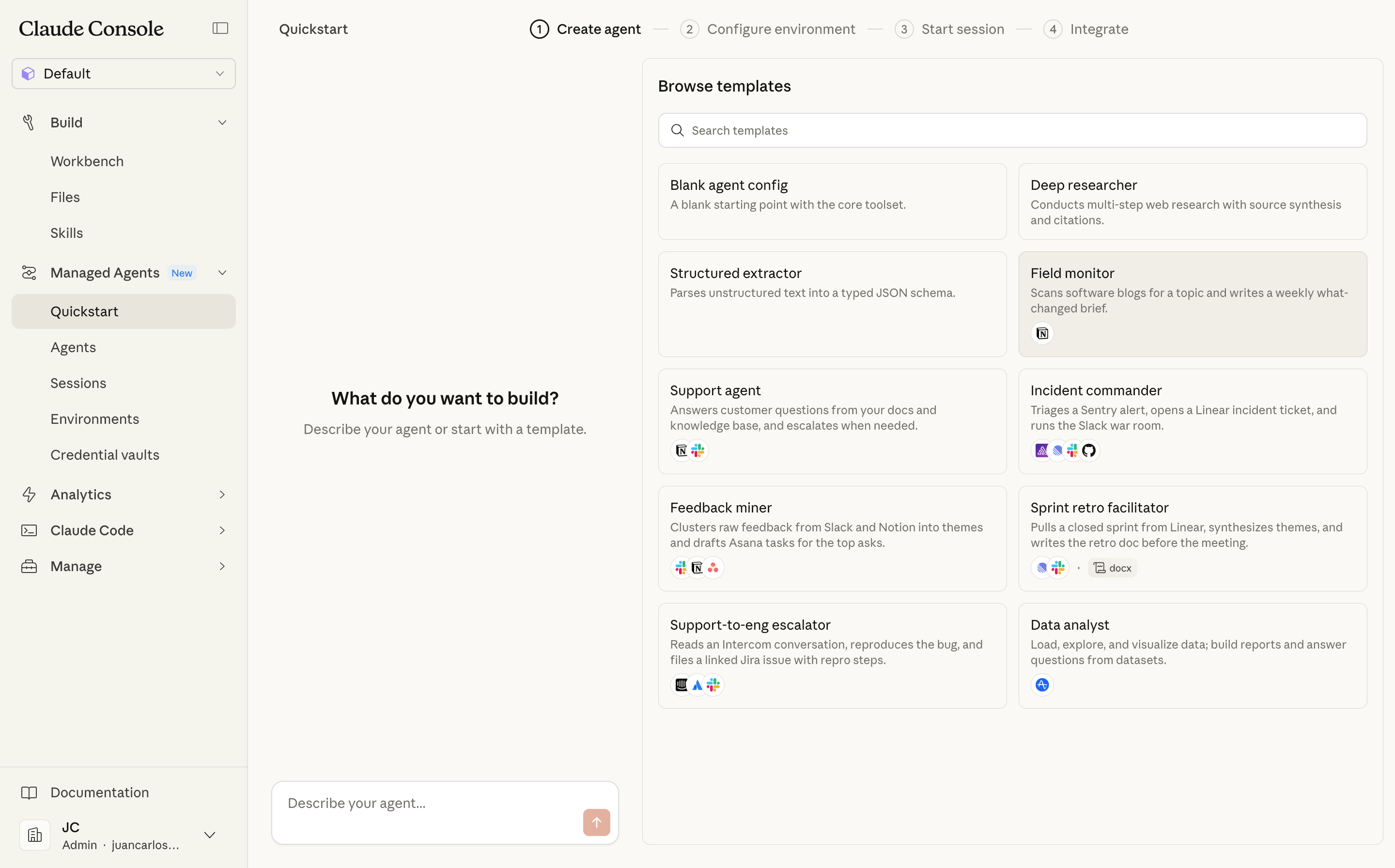
The system is built around four core concepts:
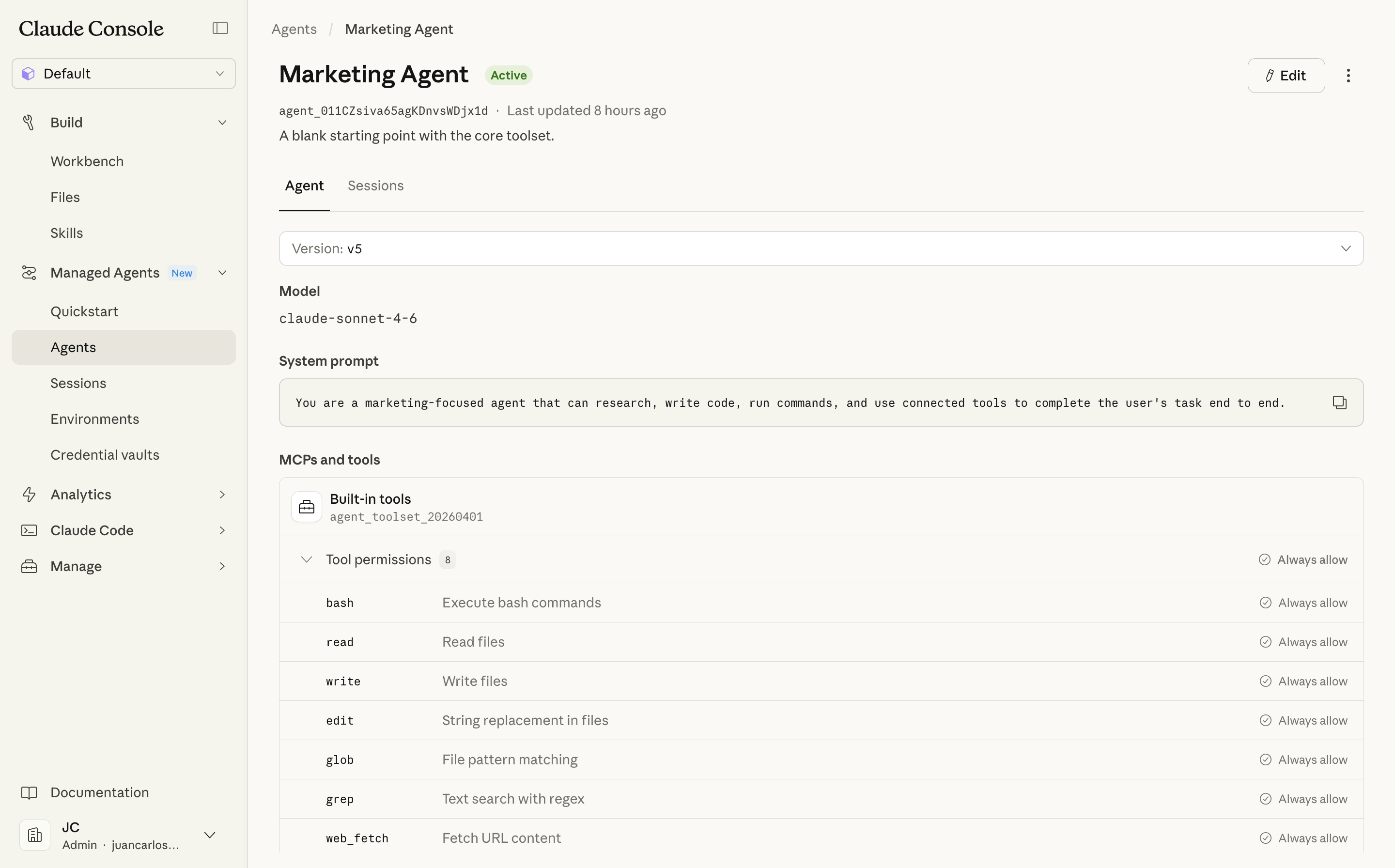
1. Agent — This is your configuration: the model, system prompt, tools, MCP servers, and skills. You create it once and reuse it across multiple sessions
2. Environment — A cloud container template where your agent runs. You can pre-install packages (Python, Node.js, Go, etc.), configure network access, and mount files
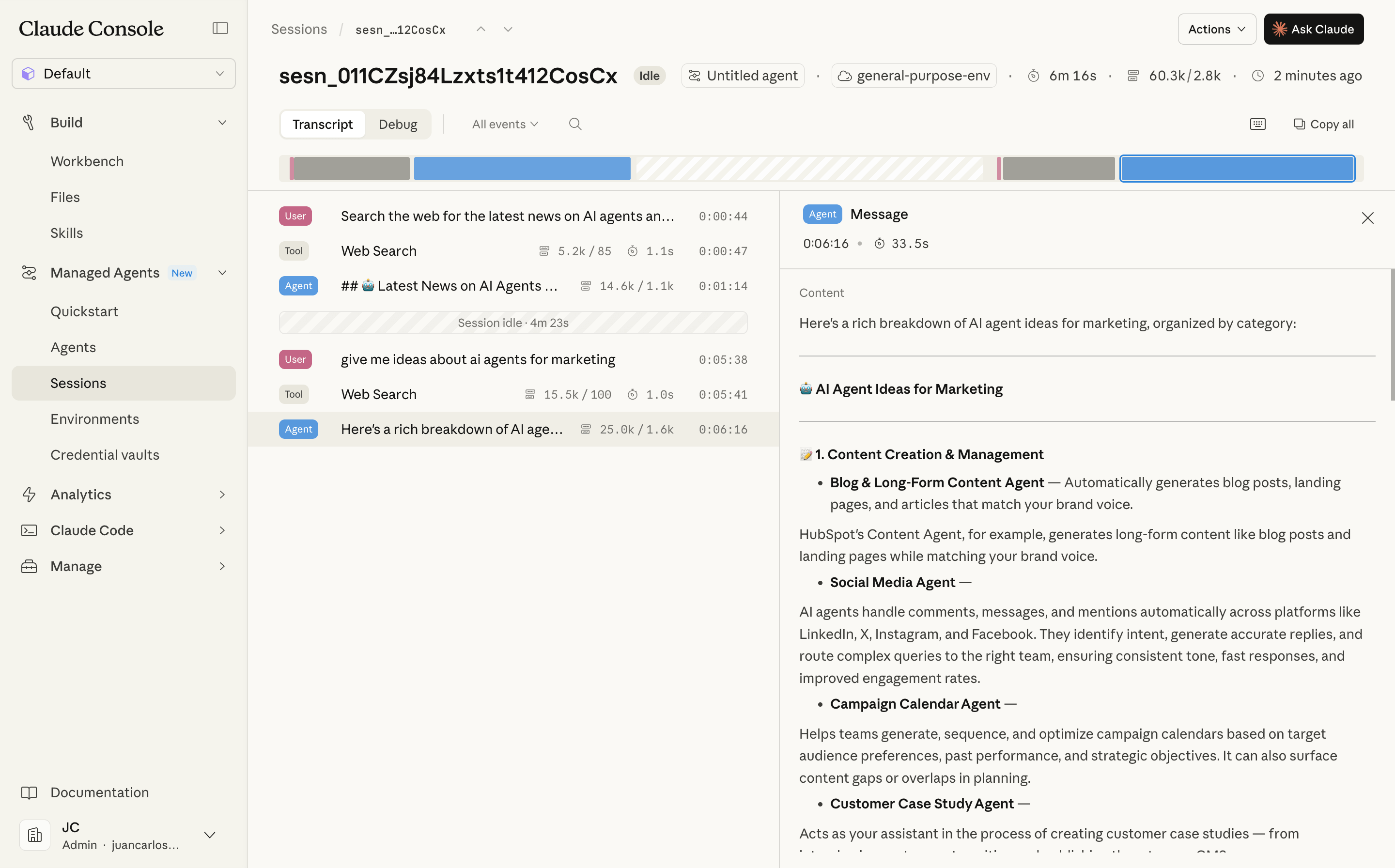
3. Session — A running instance of your agent inside an environment. Each session is isolated and has its own file system
4. Events — Messages exchanged between your application and the agent. You send instructions, the agent streams back results via server-sent events (SSE)
Here's the typical workflow:
- Define your agent (model, prompt, tools)
- Configure an environment (packages, network rules)
- Start a session
- Send a message and stream the response
- Optionally steer or interrupt mid-execution
- Deploy and integrate with your application
What makes this interesting is that sessions can run for minutes or even hours. This isn't your typical chat interaction — it's designed for long-running, multi-step tasks
What Can You Build With It?
The use cases are broad, but here are some that stand out based on Anthropic's documentation and early adopters:
Marketing and Sales — Build agents that can research leads, draft personalized outreach messages, analyze customer data, and even manage follow-ups. With access to your CRM via MCP servers, the agent can pull in relevant context and update records autonomously
Customer Service — Build agents that handle tier-1 support tickets 24/7, pull information from your knowledge base, and escalate to humans only when needed. Claude can maintain context across long conversations and adapt its tone based on customer sentiment
Code Review and Development — Agents that read your codebase, find bugs, write tests, and submit fixes. With bash access and file operations built in, the agent can work like a junior developer on your team
Document Processing — Summarize legal contracts, extract metadata from PDFs, generate reports from spreadsheets. The pre-built skills for PowerPoint, Excel, Word, and PDF files are available out of the box
Content Moderation — Classify user-generated content at scale using Claude's semantic understanding. You can define custom categories, risk levels, and handle edge cases that rule-based systems miss
Data Analysis Pipelines — Set up environments with pandas, numpy, and scikit-learn pre-installed, then let Claude analyze datasets, generate visualizations, and write findings
Pricing
According to Anthropic, customers are charged for Claude model usage plus a fee of eight cents per agent runtime hour. This is on top of the standard token pricing for whichever Claude model you choose
For reference, all Claude 4.5 and later models are supported, including Claude Opus 4.6 and Claude Sonnet 4.6
Tools and MCP Servers
One of the most powerful features is the built-in support for MCP (Model Context Protocol) servers. This means your agent can connect to external services without you building custom integrations
Anthropic has published a growing directory of remote MCP servers from companies like:
- Notion — Search, update, and power workflows across your workspace
- Slack — Send messages, create canvases, fetch data
- HubSpot — Chat with your CRM data
- Stripe — Payment processing and financial tools
- Linear — Manage issues, projects, and workflows
- Figma — Generate diagrams and code from design context
- Supabase — Manage databases, authentication, and storage
- Jira, Asana, ClickUp — Project management integrations
And many more. The full list includes over 150 remote MCP servers
This is a big deal because it means your agent can interact with the tools your team already uses, without you writing a single line of integration code
Agent Skills
Skills are modular capabilities that extend what Claude can do. Each skill packages instructions, code, and reference materials that Claude loads automatically when relevant
There are two types:
Pre-built Skills — Available immediately for working with PowerPoint, Excel, Word, and PDF files. These work on both claude.ai and the API
Custom Skills — You can create your own skills to package domain-specific expertise. For example, a skill that teaches Claude your company's coding standards, or one that knows how to interact with your internal APIs
Skills use a progressive loading system, so they don't consume context until they're actually needed. This means you can install many skills without performance impact
Getting Started
To start using Claude Managed Agents, you need:
- A Claude API key
- The
managed-agents-2026-04-01beta header on all requests (the SDK sets this automatically). Access is enabled by default for all API accounts - Read the documentation to understand how to define agents, environments, and sessions and get familiar with the API endpoints
- Build a simple agent that uses one of the pre-built skills or MCP servers to see how it works in practice
The service is currently in public beta. Some features like outcomes, multi-agent orchestration, and memory are in research preview and require separate access requests
Early adopters include companies like Notion, Rakuten, and Asana, who have already integrated Managed Agents into their products
How Is This Different From the Claude Agent SDK?
This is the question I've seen come up the most on X, Reddit, and developer forums since the announcement
Here's the short answer: the Agent SDK gives you building blocks, Managed Agents gives you a finished house
The Claude Agent SDK (formerly the Claude Code SDK) is a library you install in your own project. You write TypeScript or Python code, and you're responsible for:
- Running the agent on your own infrastructure
- Managing the execution environment
- Handling scaling, monitoring, and failures
- Setting up containers and sandboxes
With Managed Agents, Anthropic handles all of that. You define your agent through API calls, and Anthropic provides:
- Cloud containers with pre-installed runtimes
- Automatic context management and compaction
- Session persistence and event streaming
- Built-in security and sandboxing
Here's a simple comparison:
| Claude Managed Agents | Claude Agent SDK | |
|---|---|---|
| Runs on | Anthropic's cloud | Your infrastructure |
| Best for | Long-running tasks, async work | Custom agent loops, CI/CD pipelines |
| Setup effort | Anthropic manages infrastructure | You manage everything |
| Flexibility | Pre-built patterns, less overhead | Maximum control |
| Scaling | Handled for you | You handle it |
If you're building a product where you need full control over the agent loop and want to run on your own servers, the Agent SDK is the right choice
If you want to deploy agents quickly without managing infrastructure and your tasks involve long-running, multi-step work, Managed Agents is the way to go
Many teams will likely use both: the SDK for deeply integrated product features, and Managed Agents for background tasks and automation workflows
Looking to build a custom AI agent for your company?
Whether you need a customer support bot, an internal automation tool, or a complex multi-agent system, we can help you design and deploy the right solution.
Get in touch to discuss your project →Claude Managed Agents vs. Voiceflow
As a Voiceflow Certified Expert, I explored how Claude Managed Agents compares against Voiceflow. Recently, Voiceflow V4 has been released with powerful new features like Agent-based orchestration and Playbooks. It's worth understanding how these two platforms differ and where they might overlap.
The short answer: they serve different purposes and can actually complement each other
Voiceflow is a visual agent builder designed for teams that want to design conversational flows without writing code. It's excellent for:
- Building customer-facing chatbots and voice assistants
- Designing complex conversation flows with a drag-and-drop interface
- Managing knowledge bases and playbooks
- Deploying to web chat, phone, and messaging channels
- Non-technical teams that need to iterate quickly on agent behavior
Voiceflow's V4 platform introduced powerful features like Playbooks (goal-based AI skills), Workflows (deterministic step-by-step logic), and a Context Engine that dynamically routes between skills. It also supports MCP integrations with tools like Zendesk, Shopify, and HubSpot
Claude Managed Agents, on the other hand, is code-first and infrastructure-focused. It's designed for:
- Developers who need programmatic control over agent behavior
- Long-running backend tasks (code generation, data analysis, document processing)
- Multi-step workflows that require file system access and code execution
- Teams that want to leverage Claude's full tool suite (bash, web search, file operations)
Here's a practical comparison:
| Claude Managed Agents | Voiceflow | |
|---|---|---|
| Primary audience | Developers, engineering teams | Conversation designers, product teams |
| Interface | API-first, code-based | Visual drag-and-drop builder |
| Best for | Backend automation, code tasks | Customer-facing chatbots |
| Channel support | API-only (you build the frontend) | Webchat, phone, messaging apps |
| Learning curve | Medium (requires API knowledge) | Low (no-code/low-code) |
| Conversation design | You design conversation logic | Built-in flow management |
Can you use both? Absolutely. A common pattern would be to use Voiceflow for the customer-facing conversation layer (handling greetings, routing, collecting information) and then trigger Claude Managed Agents sessions via API for complex backend tasks (analyzing documents, generating reports, running code)
For example, a support agent built on Voiceflow could collect customer details through a Playbook, then kick off a Managed Agents session to analyze a support log file and return a diagnosis
Claude Managed Agents vs. Other Agent Frameworks
For developers who prefer building agents in code, it's worth understanding how Managed Agents compares to other code-based frameworks like OpenAI Agents SDK, Google Agent Development Kit (ADK), and Vercel AI SDK
All three are code libraries that help you build agents in TypeScript or Python. But they differ significantly in what they offer beyond the SDK itself
OpenAI Agents SDK
The OpenAI Agents SDK (formerly Swarm) is a lightweight, open-source framework for building multi-agent systems. It supports handoffs between specialized agents, guardrails for input/output validation, built-in tracing, and even realtime voice agents. It's provider-agnostic too — it works with 100+ LLMs, not just OpenAI models
However, OpenAI does not offer a managed hosting runtime for agents built with the SDK. You write the agent code, but you're fully responsible for deploying it, running it, scaling it, and securing it on your own infrastructure. OpenAI does offer some hosted tools like code interpreter and file search through their API, but there's no equivalent to a managed cloud container where the agent can autonomously run commands and manage files
Google ADK + Vertex AI Agent Engine
Google's approach is the most similar to what Anthropic is doing with Managed Agents. The ADK is an open-source framework for building agents (model-agnostic, works with Gemini, Claude, etc.), and Vertex AI Agent Engine is a fully managed runtime where you can deploy those agents to production
Agent Engine provides sessions, long-term memory, code execution in sandboxed environments, observability via Cloud Trace, and enterprise features like HIPAA compliance, VPC support, and customer-managed encryption keys. You can deploy ADK agents directly to Agent Engine from the command line
The key difference: Google's offering is part of the broader Google Cloud ecosystem — great if you're already on GCP, but it comes with that infrastructure's complexity. Claude Managed Agents is more focused and self-contained: you define an agent, create an environment, start a session, and you're running. No Google Cloud project setup required
Vercel AI SDK
The Vercel AI SDK is a TypeScript toolkit for building AI-powered applications. It's model-agnostic (works with Claude, GPT, Gemini, Llama, etc.) and designed to integrate into web applications, especially Next.js projects
Vercel doesn't offer a specific managed agent runtime. Instead, you build agent logic into your application and deploy it as part of your app — typically as API routes or serverless functions on Vercel's platform (or anywhere else). The agent runs within your application's lifecycle, not in a long-running isolated container
This means Vercel AI SDK is excellent for agents that are part of a web application (like a chat interface or a tool-assisted form), but less suited for long-running autonomous tasks that need file system access, bash commands, or multi-hour execution
Comparison at a glance
| Claude Managed Agents | OpenAI Agents SDK | Google ADK + Agent Engine | Vercel AI SDK | |
|---|---|---|---|---|
| Type | Managed agent runtime | Code library (no hosting) | Code library + managed runtime | Code library (no agent runtime) |
| Model support | Claude only | 100+ LLMs | Multi-model (Gemini, Claude, etc.) | Multi-model (Claude, GPT, etc.) |
| Managed hosting | Yes (Anthropic cloud) | No — you host it | Yes (Google Cloud) | No specific agent runtime — deploy as part of your app |
| Code execution | Full bash + file system | Via OpenAI's hosted tools | Sandboxed code execution | Within your app's runtime |
| Sessions & memory | Built-in, persistent | Local (SQLite) or custom | Sessions + Memory Bank (GA) | You manage state |
| Best for | Long-running autonomous tasks | Multi-agent orchestration | Enterprise agents on GCP | AI-powered web applications |
| Cloud dependency | Anthropic | None | Google Cloud | None (works on any host) |
There are other frameworks and platforms out there too (LangSmith, LlamaIndex, CrewAI, etc.) but haven't use them enough to compare them in depth since they are more focused on Python, rather than TypeScript (my preferred language)
The bottom line
If you want a managed runtime where an agent can autonomously work for hours — writing code, browsing the web, processing files — your main options today are Claude Managed Agents and Google's Agent Engine. Anthropic's offering is simpler to get started with; Google's is deeper if you're already in the GCP ecosystem
If you want to build agent logic into your own application with full model flexibility and host it yourself, the OpenAI Agents SDK, Google ADK, or Vercel AI SDK are all solid choices — with the OpenAI SDK being particularly strong for multi-agent handoffs and the Vercel SDK being ideal for web-first applications
Claude Managed Agents vs. n8n, Zapier, and Make
If you're using tools like n8n, Zapier, or Make (formerly Integromat), you might wonder where Managed Agents fits in. This comparison is more nuanced than it might seem at first, because all three of these platforms have added their own AI agent capabilities in 2025-2026
Zapier launched Zapier Agents — autonomous AI assistants that can execute multi-step tasks across their ecosystem of 8,000+ apps. You configure them with natural language instructions, connect them to your company data, and they can research leads, draft responses, manage support tickets, and more. They also added AI Guardrails for PII detection and prompt injection blocking
Make introduced Make AI Agents directly inside their scenario builder, with a reasoning panel that shows you how the agent thinks. Their agents can analyze, categorize, and make decisions autonomously within workflows. They also announced Maia, an AI assistant that builds entire automation scenarios from natural language descriptions
n8n shipped native LangChain integration with 70+ AI nodes, persistent memory across executions, vector database support for RAG workflows, and human-in-the-loop patterns. Their AI Agent node can connect to Claude, GPT, Gemini, or local models via Ollama, and supports multi-agent orchestration
So what makes Claude Managed Agents different? The core distinction isn't "AI vs. no AI" — it's where the agent runs and what it can do
On n8n, Zapier, and Make, the AI agent lives inside the automation platform. It can reason and make decisions, but its actions are limited to what the platform's integrations support — sending messages, updating CRM records, calling APIs, processing data between apps. The agent works within the platform's ecosystem
Claude Managed Agents gives the AI a full cloud computer. The agent doesn't just call APIs — it can write and run code, read and create files, browse the web, execute bash commands, and install packages. It operates in an isolated container with a persistent file system. This makes it suited for tasks that go well beyond connecting apps together, like analyzing a codebase, processing a batch of PDFs, or running a data analysis pipeline
Here's an honest comparison:
| Claude Managed Agents | n8n / Zapier / Make | |
|---|---|---|
| AI agent support | Yes — full autonomous agent runtime | Yes — built-in agents with reasoning |
| Agent actions | Write code, run commands, browse web, manage files | Connect apps, call APIs, process data |
| Execution environment | Full cloud container (bash, file system, packages) | Platform sandbox (app integrations) |
| Model flexibility | Claude models only | Multiple LLMs (OpenAI, Claude, Gemini, etc.) |
| Visual builder | No — API-first, code-based | Yes — drag-and-drop workflow canvas |
| App integrations | 150+ MCP servers (growing) | 1,500–8,000+ native connectors |
| Self-hosting | No — Anthropic cloud only | n8n: yes / Zapier & Make: no |
| Best for | Long-running tasks requiring code execution and file access | App-to-app automation with AI reasoning |
| Audience | Developers, engineering teams | Operations teams, marketers, non-developers |
Where each tool shines
Use n8n, Zapier, or Make when your workflow is primarily about connecting apps and routing data between them, even if it involves AI decision-making along the way. If you need to classify an incoming email, update a CRM, notify a Slack channel, and draft a follow-up — these platforms are purpose-built for that, and their agent capabilities make those workflows smarter
Use Claude Managed Agents when the task requires a full computing environment. If you need an agent that can clone a repo, run tests, fix bugs, and commit changes — or analyze a 200-page legal document, extract structured data, and generate a formatted report — that's where Managed Agents excels. These are tasks that can't be done by chaining API calls together
Using them together
The best part: these tools complement each other well. A common pattern would be:
- Use Zapier or Make to trigger a Claude Managed Agents session when a specific event happens (new file uploaded, support ticket created, form submitted)
- Let Claude Managed Agents do the heavy lifting (analyze the file, generate a report, process the data)
- Use n8n or Zapier to distribute the results (post to Slack, update the CRM, send an email)
For teams already invested in workflow automation, Managed Agents isn't a replacement for your existing tools — it's a new capability for tasks that were previously too complex to automate
My Personal Take
I don't like managing infrastructure, containers, and scaling. My goal is to build powerful agents that can do innovative things, provide value to users, and drive revenue for businesses
Claude Managed Agents is the first code-based solution that gives me a way to do that without having to worry about the underlying infrastructure. I can define an agent, give it some tools, and let it run autonomously in the cloud for as long as it needs to complete a task
Google Agent Engine is the closest alternative, but it requires you to be deeply embedded in the Google Cloud ecosystem and has a steeper learning curve. The Vercel AI SDK paired with Vercel hosting is what I used the most before this, but it meant I had to still maintain the orchestration layer myself — which is a lot of work
Based on my experience building AI agents with most of these platforms and SDKs, Claude Managed Agents is going to be a game-changer for businesses and teams that want to build powerful, autonomous agents without managing servers, containers, and scaling
It will significantly increase the speed of development and deployment for agents that need to do more than just call APIs
The built-in tools and MCP integrations are a huge time-saver, and the ability to run long sessions with file system access opens up new possibilities for what agents can do. It's not a one-size-fits-all solution, but for the right use cases, it can save weeks or months of development time and let you focus on the agent's capabilities rather than the infrastructure
I'm going to be heavily experimenting with it over the next few days and sharing my findings, but based on the documentation and release articles, it's clear that Anthropic is betting big on managed agents as a core part of their platform strategy. The question for teams isn't "Is this better than building your own agent runtime?" — it's "Do you want to spend time building and maintaining an agent runtime, or do you want to focus on what your agent can do?"
Summary
Claude Managed Agents is a significant step in making AI agents production-ready without the infrastructure headache. It gives developers a fast path from prototype to deployment, with built-in tools, MCP integrations, and cloud infrastructure handled by Anthropic
Whether it's the right fit for you depends on your use case:
- Building customer-facing chatbots? → Consider Voiceflow or similar visual builders
- Need app-to-app automations with AI reasoning? → n8n, Zapier, or Make now have built-in AI agents for that
- Want full control over your agent code? → Use the Claude Agent SDK, OpenAI Agents SDK, or Vercel AI SDK
- Need a managed runtime on Google Cloud? → Google ADK + Agent Engine is the closest alternative
- Need long-running, autonomous agents in production without managing infrastructure? → Claude Managed Agents is built for exactly this
The AI agent landscape is evolving fast, and Claude Managed Agents is Anthropic's bet that most teams would rather focus on what their agents do than how to keep them running
Looking to build an agent for your business?
We've built agents for various businesses and industries. Whether you need an agent for customer support, internal agents, or just a second opinion on your architecture, we can help.
Book a Free Consultation →