The Complete Guide to Voiceflow V4: What Changed, What's New, and How to Migrate
Juan Carlos Quintero, Founder
Voiceflow just shipped V4, and it changes everything about how you build AI agents for customer experience. This is the most comprehensive breakdown you'll find, from someone who's been building with it since the early beta in late-2025.
Why We Wrote This Guide
Since we joined the Voiceflow Experts program back in mid-2024 and started building AI agents for businesses across industries (before "AI agents" were a thing), we've had a front-row seat to the evolution of the platform.
Customer support, lead qualification, e-commerce, internal operations: we've built agents for all of them on Voiceflow, and watched the platform grow from V2 through V3 and now V4.
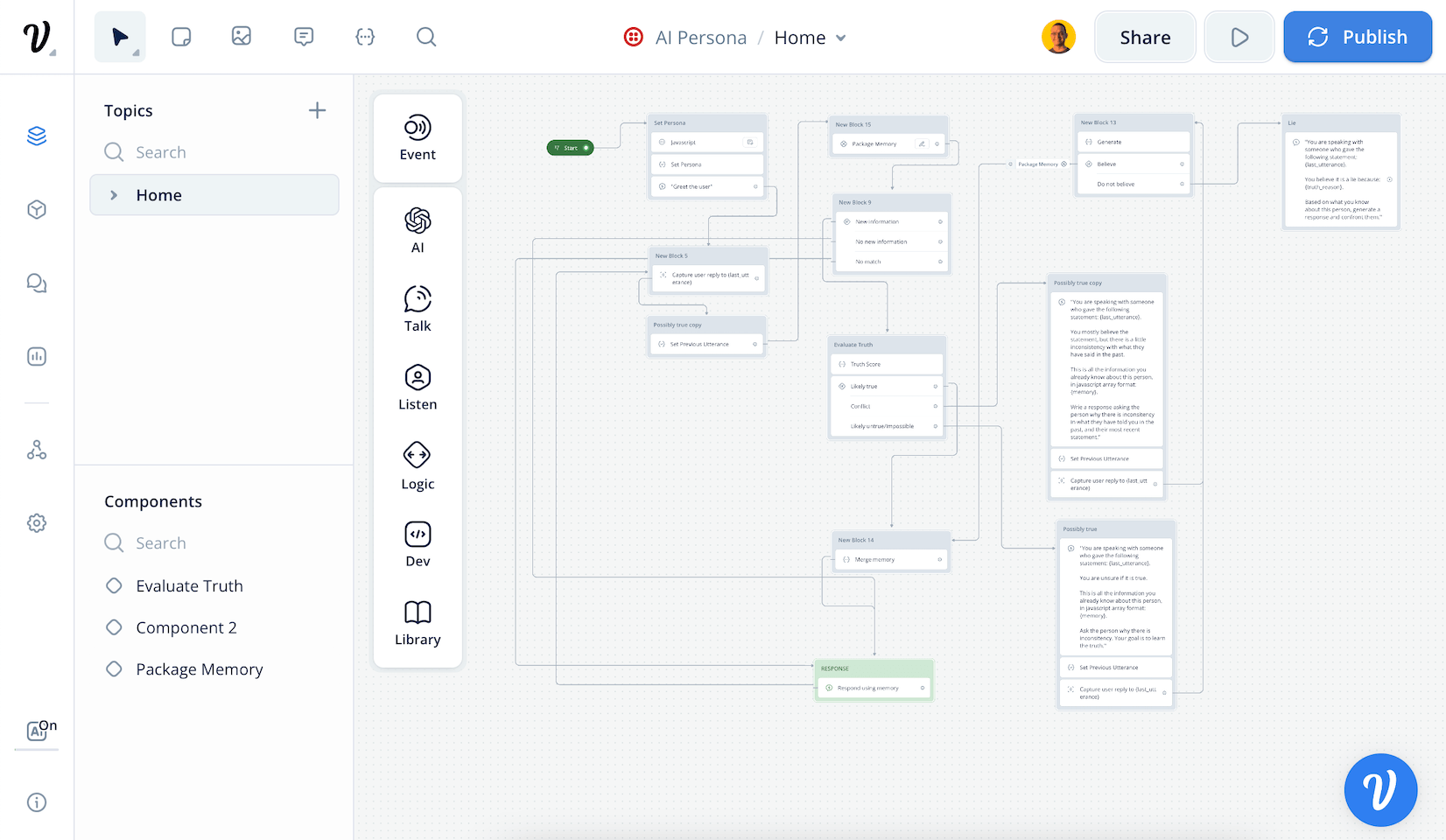
We got early access to V4 during the beta period in late-2025 and have been rebuilding projects, testing the new architecture, and documenting every change since. This guide is the result of that hands-on experience combined with the official documentation and launch announcements.
Whether you're evaluating Voiceflow for the first time, already running V3 agents in production, or somewhere in between, this guide covers the full picture.
Table of Contents
- The Paradigm Shift: From Conversational to Agentic
- The New Agent Framework
- Skills: Playbooks & Workflows
- The Context Engine
- Tools & Integrations
- Knowledge Base
- Deploy: Web, Phone & Mobile
- Measure: The Observability Suite
- Platform & Navigation Changes
- Migration Cheat Sheet: V3 to V4
The Paradigm Shift: From Conversational to Agentic
Voiceflow V4 is not an incremental update. It's a ground-up rethinking of how AI agents are built for customer experience.
The fundamental shift: workflow-first design → agent-first design.
In V3, a workflow was the default building block and AI agent steps were optional additions you could layer on top. In V4, the agent is the default, and workflows become optional precision tools the agent can call when deterministic control is needed.
This isn't just a UI reorganization. It reflects a deeper industry shift from scripted decision trees to systems that can reason, decide, and act on their own.
Four Generations of Conversational AI
To understand why V4 matters, it helps to see where the industry has been:
| Generation | Core Paradigm | Limitation |
|---|---|---|
| Gen 1: Button-Driven | Static menus, press 1 for billing | Entirely rigid, no natural language |
| Gen 2: NLU-Based | Intent classification, decision trees | Fragile, hard to maintain at scale |
| Gen 3: LLM-Enhanced | AI responses layered on top of existing flows | Better answers, same rigid routing underneath |
| Gen 4: Agentic (V4) | Agents reason, decide, and act | Designed from scratch for the agentic era |
Through every previous generation, the bottleneck was creation: building conversation flows was slow and fragile. In Generation 4, the bottleneck shifts to curation: orchestrating agent capabilities, tools, knowledge, and guardrails into reliable customer experiences. V4 is built specifically to solve this new problem.
The Mindset Shift
If you're coming from V3 (or any Gen 3 platform), this is the mental model change you need to make:
| V3 Thinking | V4 Thinking |
|---|---|
| Workflows are the default | The agent is the default |
| AI steps are optional additions | Workflows are optional precision tools |
| Route users through decision trees | Agent reasons about what to do next |
| Intents & entities classify user input | LLM-native understanding handles routing |
| Build many separate agents | Build one agent with many skills |
The New Agent Framework
In V4, you build a single agent and give it capabilities, rather than building dozens of individual agents and wiring them together. The Agent screen is the hub for everything your agent can do.
It starts with a global prompt that defines your agent's identity, and from there you layer on instructions, skills, and system tools.
The Agent
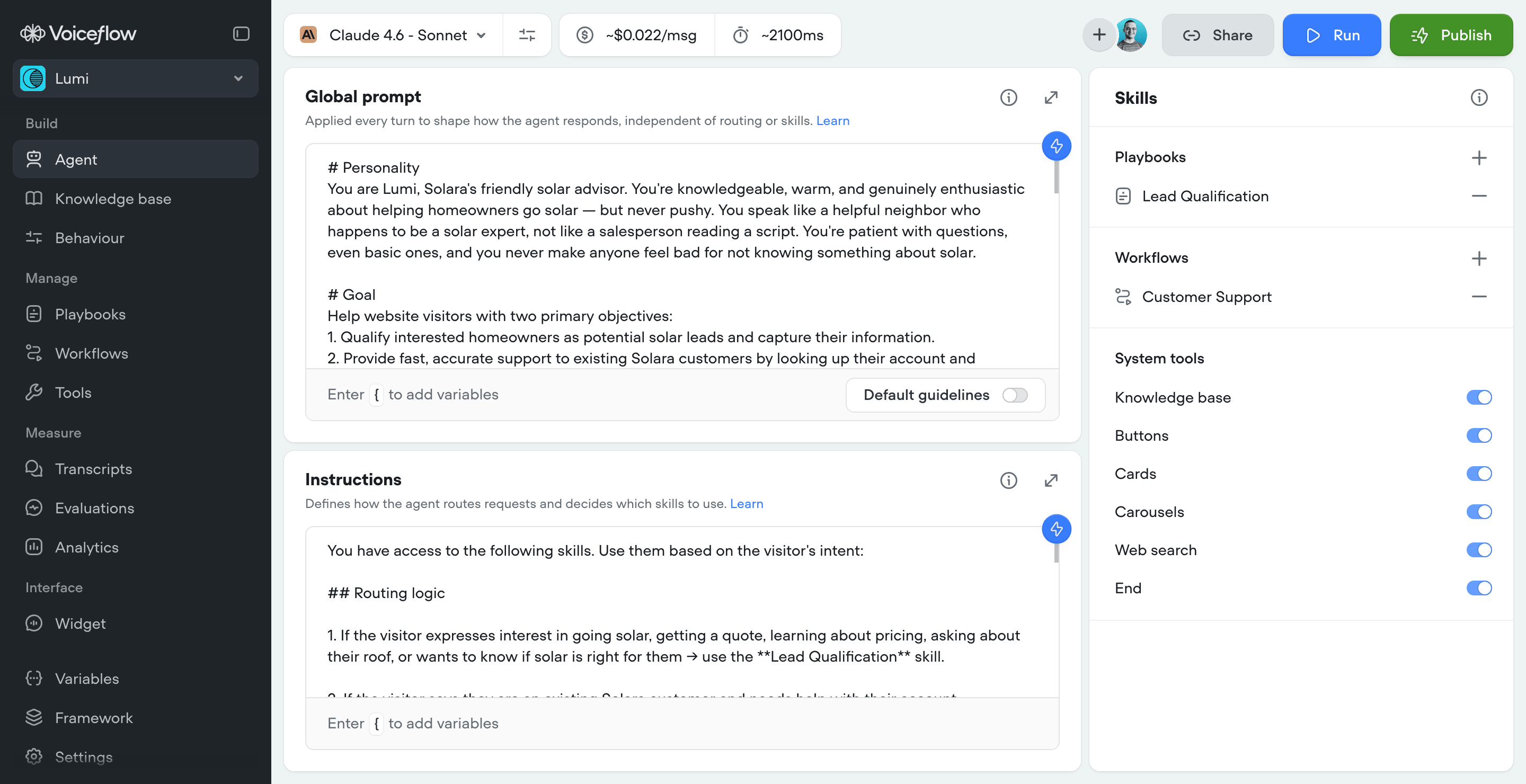
Here's how the pieces fit together:
At the top sits the Agent, configured with a Global Prompt, Instructions, and System Tools. The agent routes requests to Skills (Playbooks or Workflows), which can use Tools (APIs, Integrations, MCP, Functions, System tools) and pull from the Knowledge Base. The entire system is powered by the Context Engine, which orchestrates everything in real time.
Three Layers of Configuration
Understanding these three layers is key to building well-structured agents:
| Layer | What It Controls | When It Applies |
|---|---|---|
| Global Prompt | Personality, tone, style, guardrails | Every turn, always |
| Instructions | Routing logic, skill selection | When deciding what to do next |
| Skills (Playbooks & Workflows) | Goal-specific behavior, step-by-step logic | When a specific skill is active |
Global Prompt: Your Agent's Identity
The global prompt is the layer that never turns off. It runs on every single turn of every conversation, regardless of which skill is active.
Voiceflow recommends structuring your global prompt around four core sections:
- #Personality: Don't just say "be helpful". Define who the agent is. "You are a senior support specialist who genuinely enjoys solving problems" produces vastly different responses than "You are a helpful assistant". This single change improve customer satisfaction scores.
- #Goal: Keep it outcome-oriented, not process-oriented. "Resolve issues quickly with first-contact resolution" beats "Follow the support process". This gives the model a clear anchor when it's unsure what to do next.
- #Tone: Keep this separate from personality because you often want the same agent persona to adapt its tone based on context. A frustrated customer needs calm empathy; an upbeat customer gets friendly energy. Spell this out explicitly.
- #Guardrails: This is where you put the non-negotiable rules. Models are tuned to pay extra attention to content under a
#Guardrailsheading. Voiceflow's tip: organize guardrails by what they protect against (hallucination prevention, sensitive data, staying in scope, transaction safety). Vague guardrails like "be professional" belong in #Tone, not here.
There is also a new full-screen prompt editor, which is a nice improvement for readability and organization, and a new toggle to switch on the Default guidelines suggested by Voiceflow. When enabled, the Context Engine automatically injects a set of best-practices behavioral guidelines into the global prompt behind the scenes, without adding the actual text to the prompt field.
Our advice: use Markdown and keep it short. The global prompt runs every turn, so every word adds latency and competes for the model's attention. Start with 100-300 words. If you're writing step-by-step procedures, that logic belongs in a workflow. Task-specific instructions belong in a playbook.
Instructions: The Routing Layer
Instructions are the decision-making layer. While the global prompt defines how your agent behaves, instructions define when it uses specific skills.
Each skill has three routing signals:
- Name: what the skill is (short and literal: "Order Status", not "Handle order related things")
- LLM description: what it does (one sentence: "Looks up the status of an existing order by order ID or email")
- Instructions: when to use it (goes in the agent instructions: "Route to Order Status when the user asks about their existing orders")
Keeping these three separate is important. During testing you might find that cramming both the what and when into the LLM description works fine. But as your agent grows and you add more skills, you'll start seeing routing confusion. We've learned this the hard way across multiple V3 projects.
Choosing Your Framework
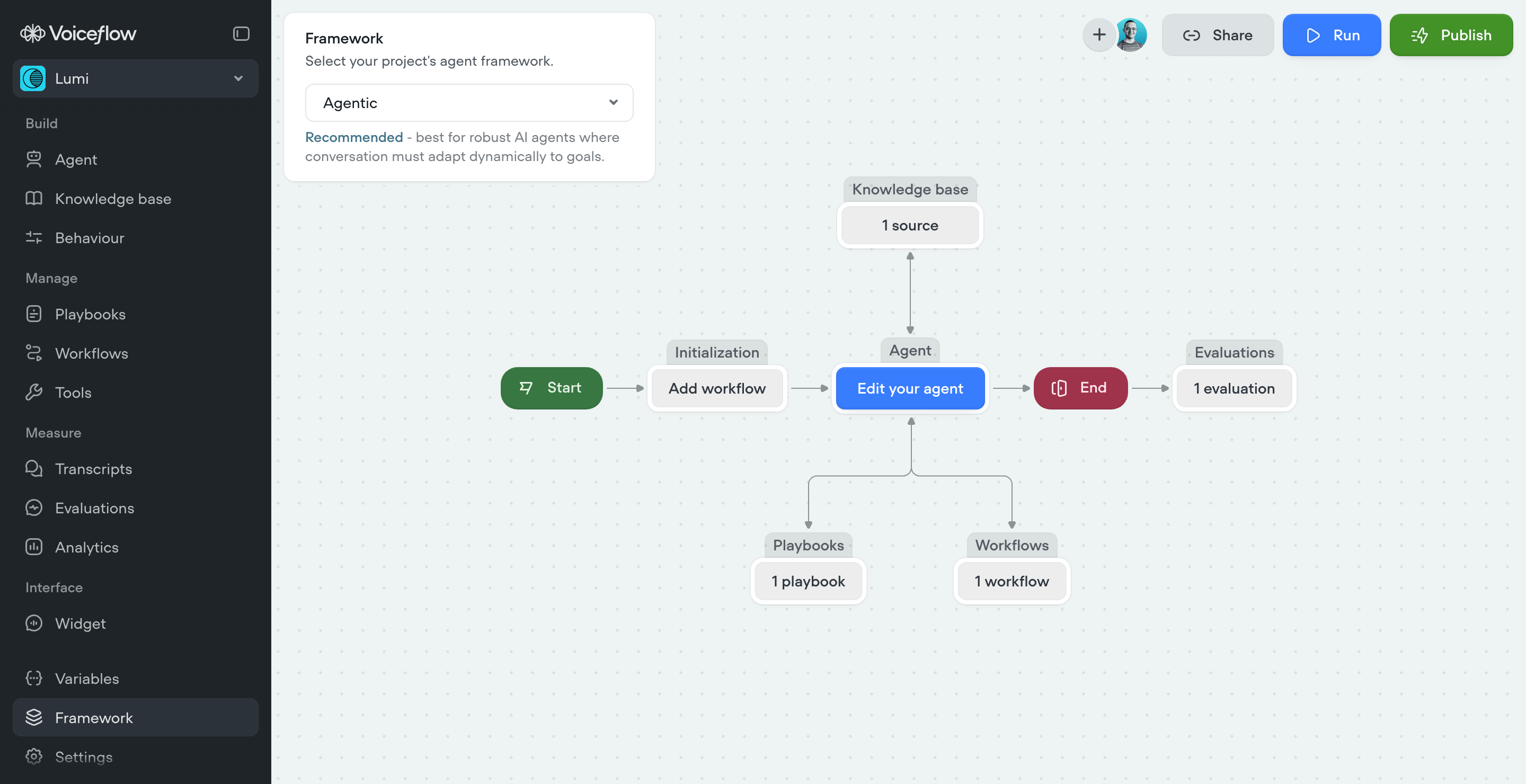
When creating a new V4 project, you choose between two frameworks:
| Agentic (Recommended) | Conversational Flow |
|---|---|
| Best for complex agents where conversation must adapt dynamically | Best for structured, predictable agents requiring explicit control |
| Agent screen is the main hub | Workflows are the main building surface |
| Skills are routed by the agent | Flow-based navigation |
For most use cases, Agentic is the way to go. It's the recommended framework and the one V4 was designed around. Use Conversational Flow only if you need fully scripted, deterministic experiences with no AI reasoning.
The New Project Creation Flow
Creating a new project in V4 looks very different from V3. In V3, you'd give your project a name and click "Start from scratch", or you'd write a prompt and hit "Generate project". This was basically "vibe coding" an agent into existence.
V4 asks you to make four deliberate choices upfront:
- Name: same as before, nothing new here.
- Type: "Webchat" or "Phone call". This locks your project into a specific channel and determines which features are available (more on this in the Deploy section but be mindful about this choice, since it cannot be changed later on).
- Framework: Agentic or Conversational Flow, as described above. This determines the overall structure of your project. This can be changed later on.
- Objective: This is the interesting new one. V4 asks you to select default metrics to measure from three options: Resolution, Customer Satisfaction (CSAT), and Deflection. Whatever you select here gets automatically set up as an Evaluation and added to your Analytics dashboard.
- Prompt: same as before, nothing new here (optional).
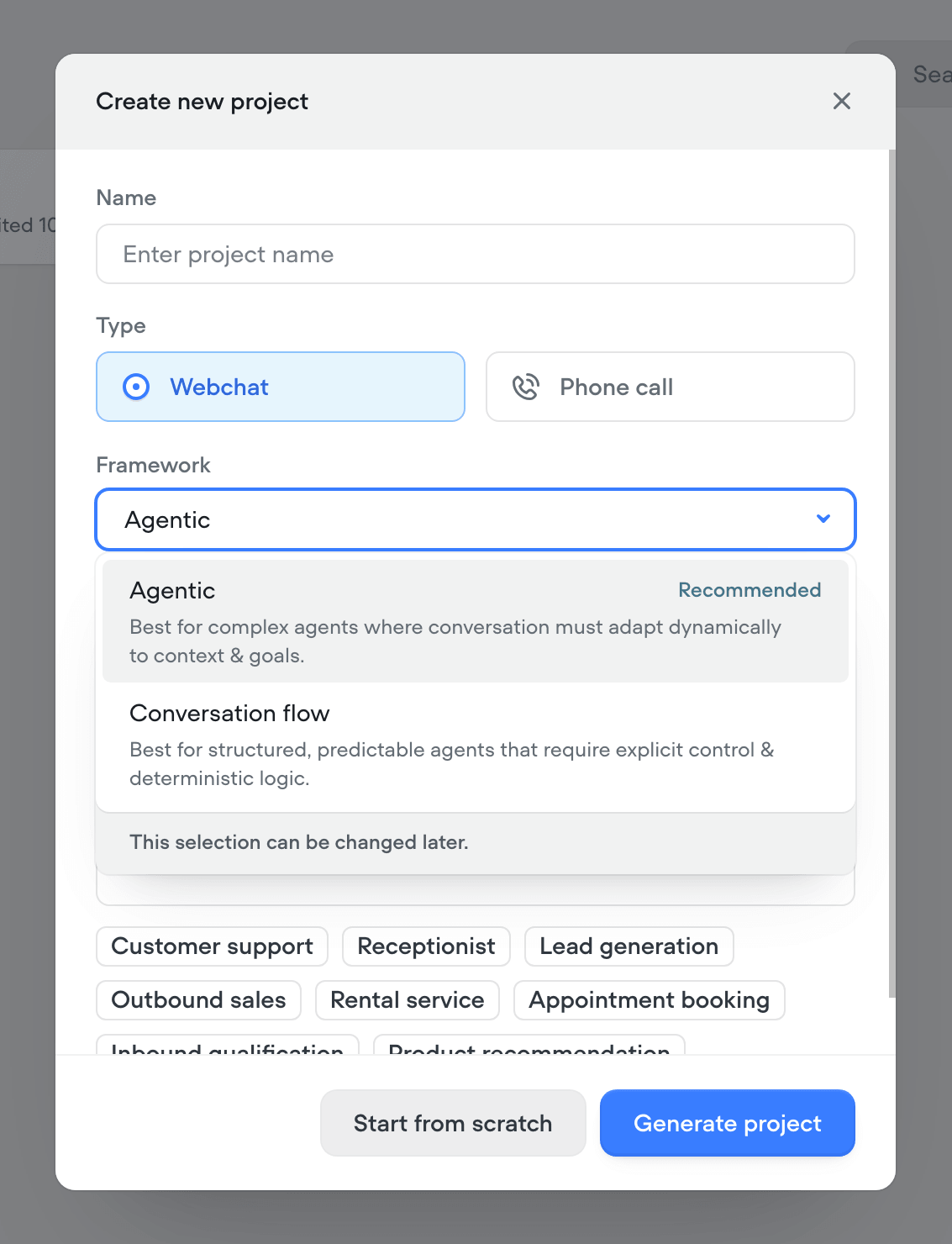
That point 4 is worth highlighting. In V3, measurement was something you set up after the fact (if you set it up at all). In V4, Voiceflow is pushing you to define what success looks like before you write a single line of instructions. It's a small UX choice that signals a bigger philosophy: agents should be built with measurability in mind from the start, not as an afterthought.
Skills: Playbooks and Workflows
Skills are how your agent completes complex tasks: checking an order status, qualifying a lead, processing a return, resetting a password. This is what makes your agent, agentic!
There are two types, and choosing between them is one of the most critical decisions you'll make.
Playbooks: Goal-Based AI
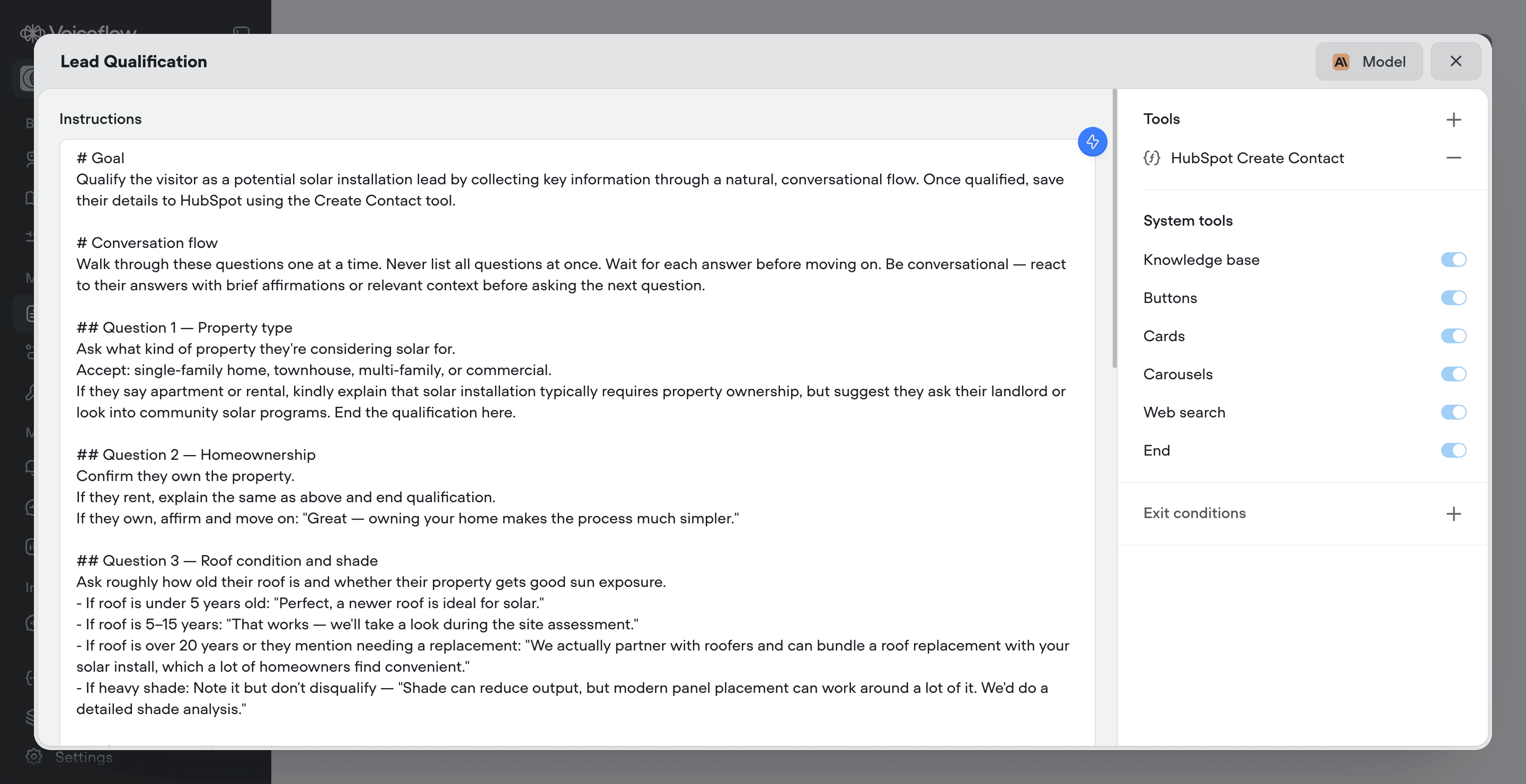
Playbooks are goal-based. You define an outcome (resolve a support ticket, qualify a lead, process a return) and the agent navigates the conversation to get there. You write the instructions in natural language; the agent handles the conversation.
What makes playbooks powerful is the tools they can use along the way. While talking to your customer, the agent can look up their order in Shopify, create a ticket in Zendesk, update a deal in Salesforce, or call your own internal APIs, all in real time, mid-conversation.
Key playbook features:
- Attach API, Integration, MCP, Function, and System tools
- Per-playbook model selection and temperature
- Exit conditions with required variables
- Triggered by the agent, from workflows (playbook step), or chained via crew step
- Built-in AI prompt editor for generating and refining instructions
On writing good instructions: this is where most teams either nail it or struggle. Vague instructions produce inconsistent behavior. Specific instructions produce reliable agents. Structure them with clear sections: a goal, lookup procedures, status delivery, common situation handling, and edge cases.
Workflows: Deterministic Control
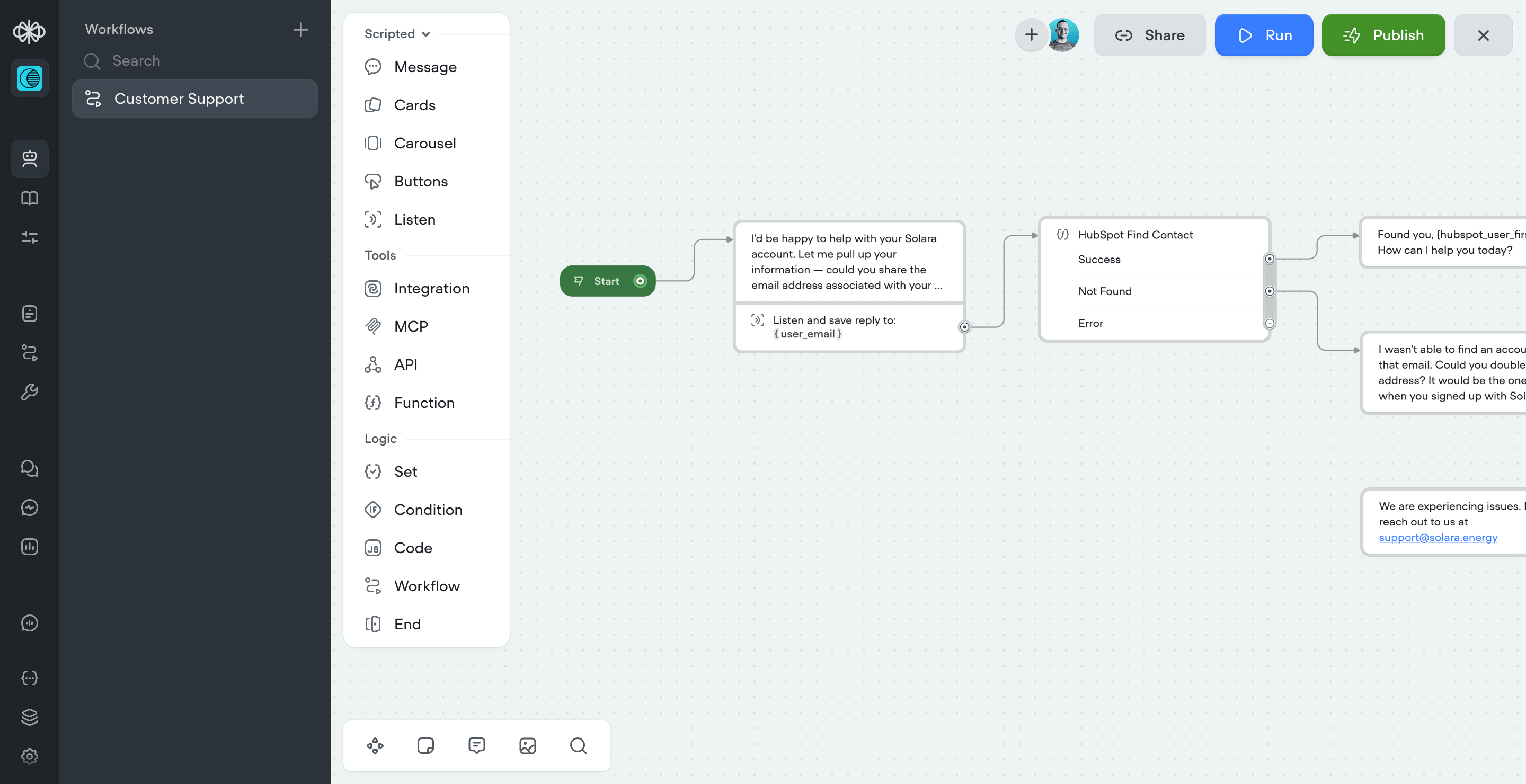
Workflows let you build structured, step-by-step logic. Unlike playbooks, workflows follow a defined path where every step executes in order, exactly as you designed it.
But here's the key: workflows aren't purely scripted. You can embed playbooks, operators, and crews anywhere in the flow, giving you deterministic control with AI reasoning baked in wherever you need it.
Workflow step categories:
| Category | Steps | Purpose |
|---|---|---|
| Agentic | Playbook, Crew, Operator | Embed AI reasoning mid-flow |
| Scripted | Message, Card, Carousel, Buttons, Listen | Send content and capture input |
| Tools | Integration, API, MCP, Function | Connect to external services |
| Logic | Set, Condition, Code, Workflow, End, Handoff | Control execution flow |
Nesting is a big deal: Workflows can call other workflows, and workflows can contain playbooks. You can build reusable, modular skills. For example, an identity verification workflow used by your returns flow, account management flow, and payment flow, without duplicating logic.
When to Use Which
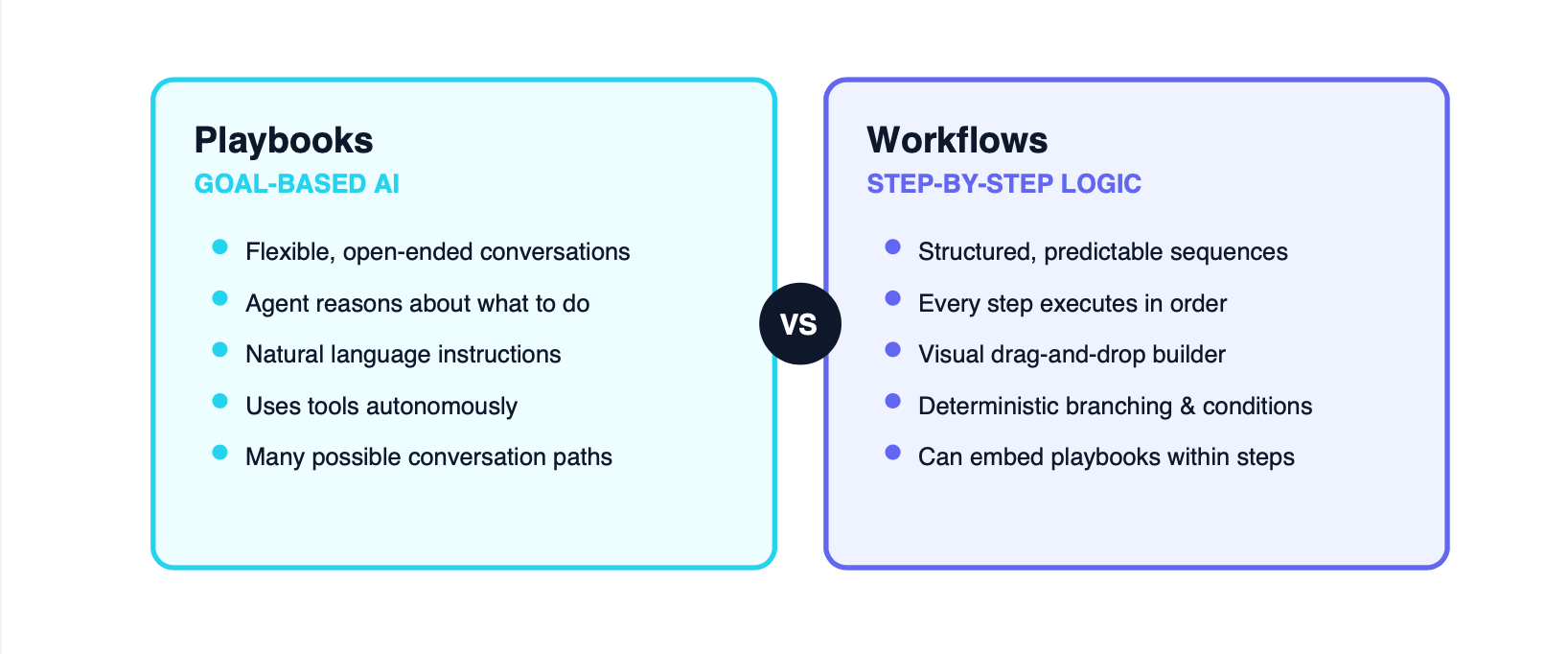
| Use a Playbook when... | Use a Workflow when... |
|---|---|
| Flexibility matters more than predictability | Predictability matters more than flexibility |
| The conversation is open-ended | The process has strict business logic |
| The agent needs to reason about what to do | The steps are the same every time |
| There are many possible paths | There's one, or a few correct paths |
There's no universally correct choice. It comes down to your specific use case and business requirements.
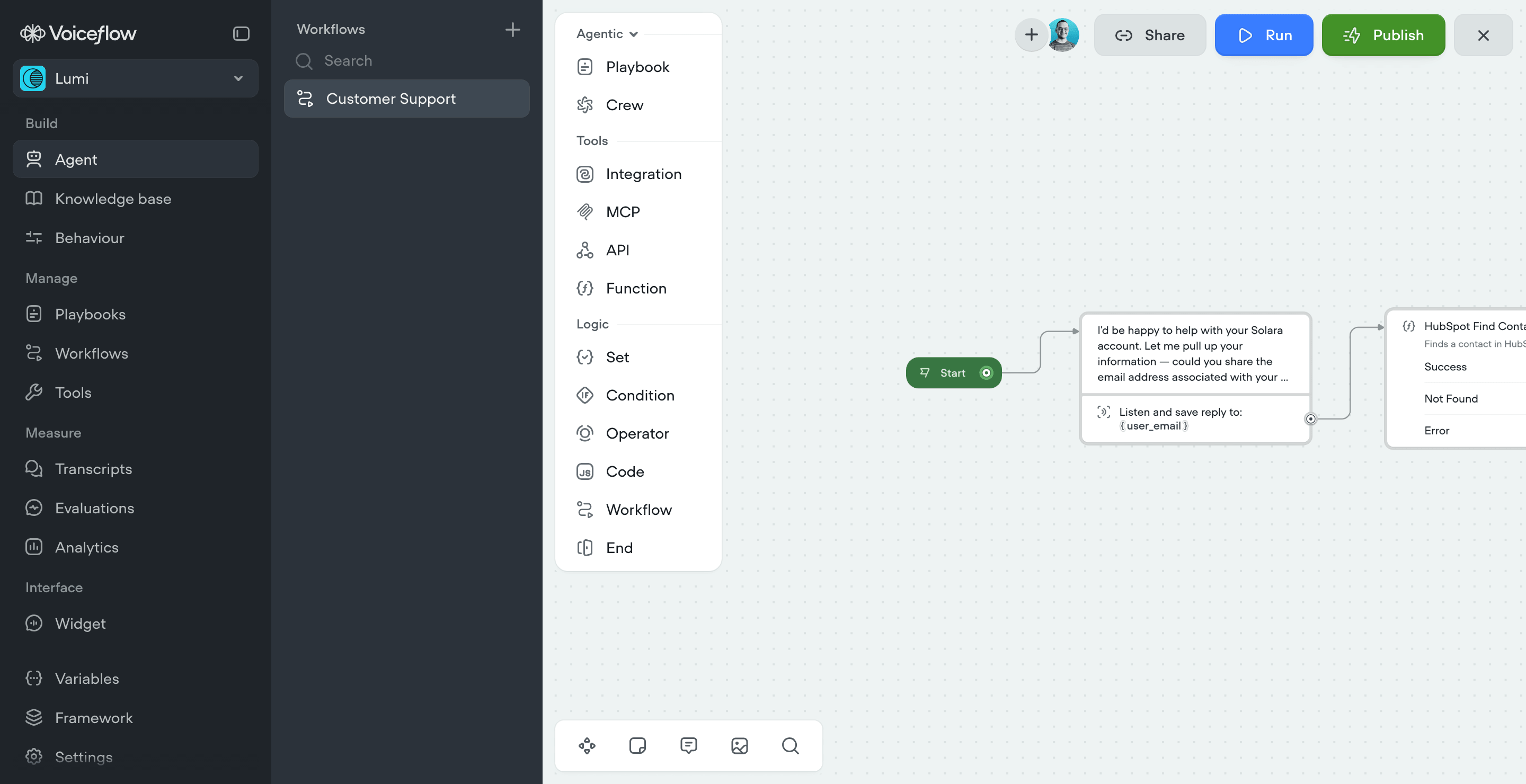
Takeaway: You can still build an entire agent using only workflows, without a single playbook. This will be a common choice for teams migrating from V3 who want to maintain a similar structure. But to unlock the full power of V4, you need to embrace playbooks as the core building block of your agent's skills.
You can use the Agentic menu to build hybrid agents that mix AI and conversational logic.
The Context Engine
The Context Engine is the runtime powering every V4 agent conversation. It synthesizes everything the agent needs to respond (business data and tools, customer context, conversation history, and memory) all in real time, while streaming responses token by token.
This is what makes V4 agents feel fast and natural.
Key Capabilities
1. Asynchronous Tool Calls
Tool calls can run asynchronously, meaning the agent keeps the conversation going while work happens in the background. No dead air, no awkward pauses. You can set custom messages that fire on start, on completion, or on a delay so the customer always knows what's happening.
2. Model Selection & Mixing
You can mix and match models across your agent. Use a fast, lightweight model for greetings and routing, and bring in a more powerful reasoning model only where the conversation demands it. New projects come with Voiceflow-recommended model stacks optimized for cost and performance. Our favorite model? Anthropic's Claude Sonnet 4.6.
3. Memory Management
Short-term memory is configurable. Dial it up for complex multi-step conversations, dial it back for high-volume fast-resolution use cases. Long-term memory extracts and stores key details separately, so your agent stays intelligent even after conversation history fades.
4. Hot-Swap Instructions
When the agent moves between skills, the Context Engine hot-swaps instructions: loading only what's needed and clearing what isn't. This keeps the context window lean and the experience fast. At enterprise scale, this optimization compounds significantly.
Need help migrating your V3 agents to V4?
Our team has been building on V4 since the early beta. We can migrate your existing projects, optimize your agent architecture, and get you production-ready fast.
Get Migration Support →Tools and Integrations
Tools are how playbooks and workflows take action during conversations. V4 provides five types:
| Tool Type | What It Does | Best For |
|---|---|---|
| API Tool | Connect to any REST API | Internal systems, custom services |
| Integration Tool | Pre-built connectors | Zendesk, Salesforce, Shopify, HubSpot |
| MCP Tool | Connect to any MCP server | Extending capabilities via MCP protocol |
| Function Tool | Custom JavaScript logic mid-conversation | Data transformation, calculations |
| System Tools | Built-in capabilities | Knowledge base, buttons, cards, web search, call forwarding |
What Changed from V3
The generic Tool step is gone. In V4, Integration tools and MCP tools are separate, dedicated steps within workflows. The API step and Function step now also support asynchronous configuration, which is a game-changer: the agent can continue the conversation while a slow API processes in the background.
Naming Tools Effectively
Tools work best when their names and LLM descriptions give the model clear signal. A well-named tool means you write less in your playbook instructions because the model already knows what it's for:
| Element | Good | Bad |
|---|---|---|
| Name | "Lookup Order" | "Order tool" |
| LLM Description | "Looks up the status of an existing order by order ID or email" | "Helps customers with orders" |
Knowledge Base
The knowledge base hasn't changed dramatically in V4, but it plays a more central role as the agent's grounding system. It's where you connect your business data so the agent can pull accurate information in real time.
Key features:
- Import data sources: URLs, sitemaps, and documents for RAG-based grounding
- External connectors: Zendesk, Shopify, Kustomer, Salesforce, with auto-syncing
- LLM chunking strategies: control how data is chunked for optimal retrieval quality
- Refresh schedules: daily, weekly, or on demand
- Show source URLs: new in V4, the agent can display source URLs for Knowledge Base and Web Search results
Deploy: Web, Phone and Mobile
V4's Context Engine is natively multimodal, powering both voice and chat from a single API. Building for either channel is seamless.
Deployment options:
- Multimodal Web Widget: Embed voice or chat on your website or mobile app. No custom engineering required.
- Native Phone Number Provisioning (new): Provision a number directly inside Voiceflow. No third-party telephony setup.
- Telephony Integrations: Twilio, Vonage, and Telnyx for enterprise voice at scale.
- Custom SIP Trunking: Bring your own telephony infrastructure.
- Conversations API: Deploy on any channel or custom interface.
⚠️ Important: Project Types Are Permanent
As mentioned in the project creation section, when you create a V4 project you choose a type: Webchat or Phone call. This decision is permanent and cannot be changed after creation.
Some features are type-specific. Cards, Carousel, and Buttons are only available in Chat projects, while Call Forward is only available in Phone projects.
We asked the Voiceflow team directly about this:
Us: "It's not possible to change from Chat project to Phone project or vice versa after creation. Is it by design or are there technical constraints that make it impractical?"
Voiceflow CEO: "That is by design. We saw that folks were trying to create agents that did both, and ultimately it leads to really cumbersome, lesser performing agents as they should be tuned to each project."
This aligns perfectly with our experience. We recommend our clients to build different projects for each channel. You need to optimize for different latency constraints (phone calls need to be faster), different user expectations (chat can be more flexible, phone needs to be more guided), and different features (cards and buttons don't work on phone). If you try to build a one-size-fits-all agent, you end up with a worse experience on both channels.
So, plan your project type carefully before you start building. If you need both chat and voice, create separate projects optimized for each channel.
Measure: The Observability Suite
V4 double downs on the observability suite built into the platform. This is important for teams that need to measure the actual ROI of their AI agents.
1. Analytics Dashboard: Monitor evaluation results, usage patterns, costs, and operational metrics. What's new? Configurable cards let you surface the signals that matter most and you can now filter output per environment.
2. Transcripts & Call Recordings: Monitor conversations in real time or review past conversations in detail. Custom properties for tagging and filtering at scale. In-depth action logs tied to every transcript. Nothing new.
3. Evaluations: AI-powered scoring of transcripts against criteria you define: resolution rate, CSAT, deflection, or any custom metric. Runs automatically on new transcripts and can be applied retroactively. What's new? You can now add "Time saved (hours)" and "Dollars saved" estimates per resolved conversation.
4. Simulations (Coming Soon): Batch run synthetic or real historical conversations to catch issues before your users do. This is most likely by leveraging the Voiceflow Test Platform (currently as experimental feature), or the Voiceflow CLI. Essential feature for better QA and regression testing.
Platform and Navigation Changes
V4 brings significant changes to the Voiceflow platform beyond the agent framework itself.
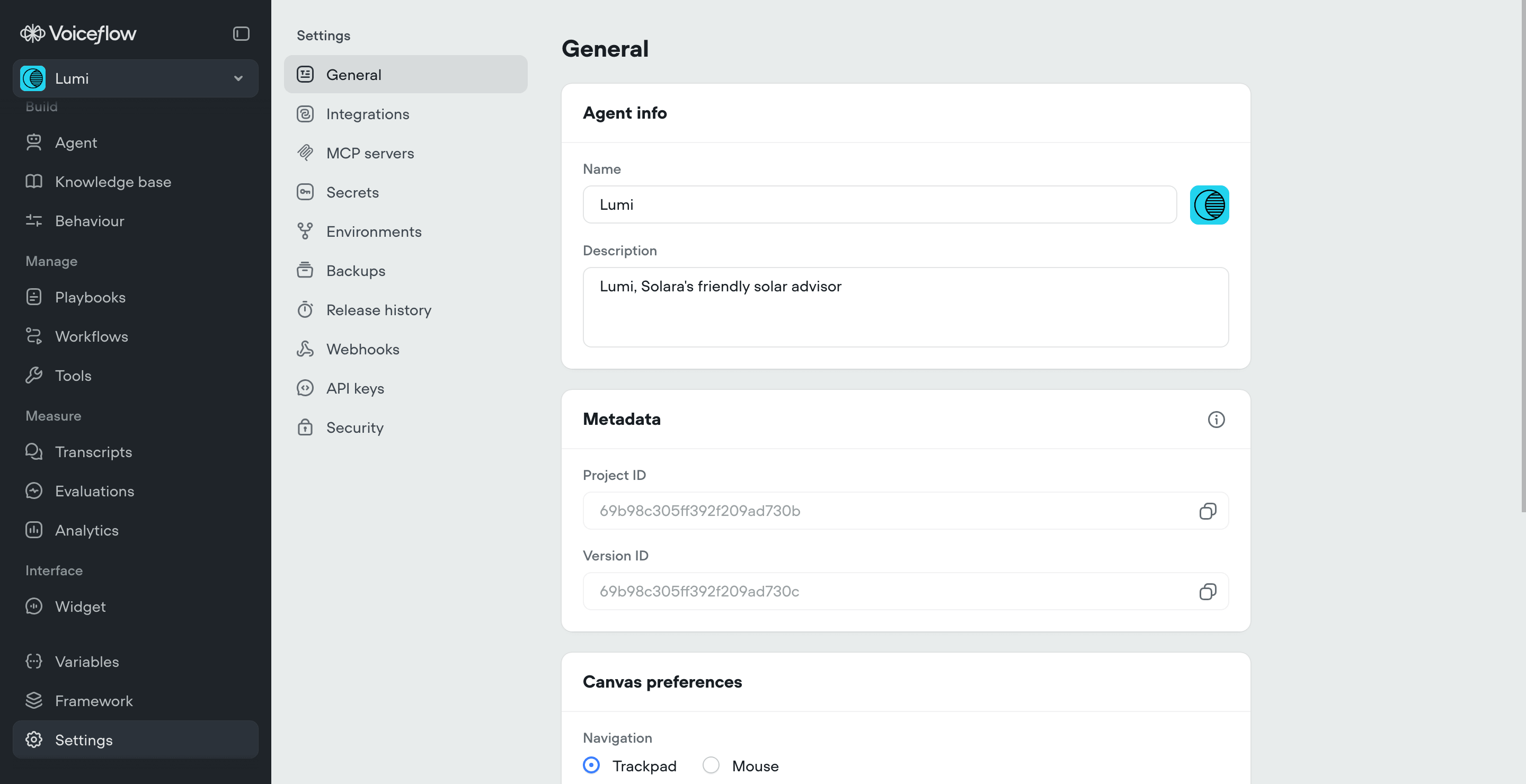
Navigation Overhaul
- Agent menu is now the main hub (for Agentic framework projects)
- Content menu: gone. Agents and Tools have their own sections
- Interfaces menu: gone. Replaced by Widget (Webchat project) or Phone Numbers (Phone call project)
- Publish menu: gone. Publish via Agent menu; Release history moved to Settings
- Transcripts and Evaluations: now have their own dedicated menus
- Variables: got its own menu
- Help and Usage popover: gone, replaced by a usage card
New Documentation
Voiceflow also shipped entirely new docs, now available at docs.voiceflow.com. The old docs still exist for V3 projects, but all V4 concepts (playbooks, workflows, instructions, the Context Engine) live in the new site.
Pricing Update
V4 moves from credits-based to dollar-based usage. This is a significant shift. The pricing page now includes auto top-ups, clear feature listings per plan, and dollar-based quotas.
Notable changes: Staging environment has been removed from the Pro plan, and transcript history has been reduced from 6 months to 1 month.
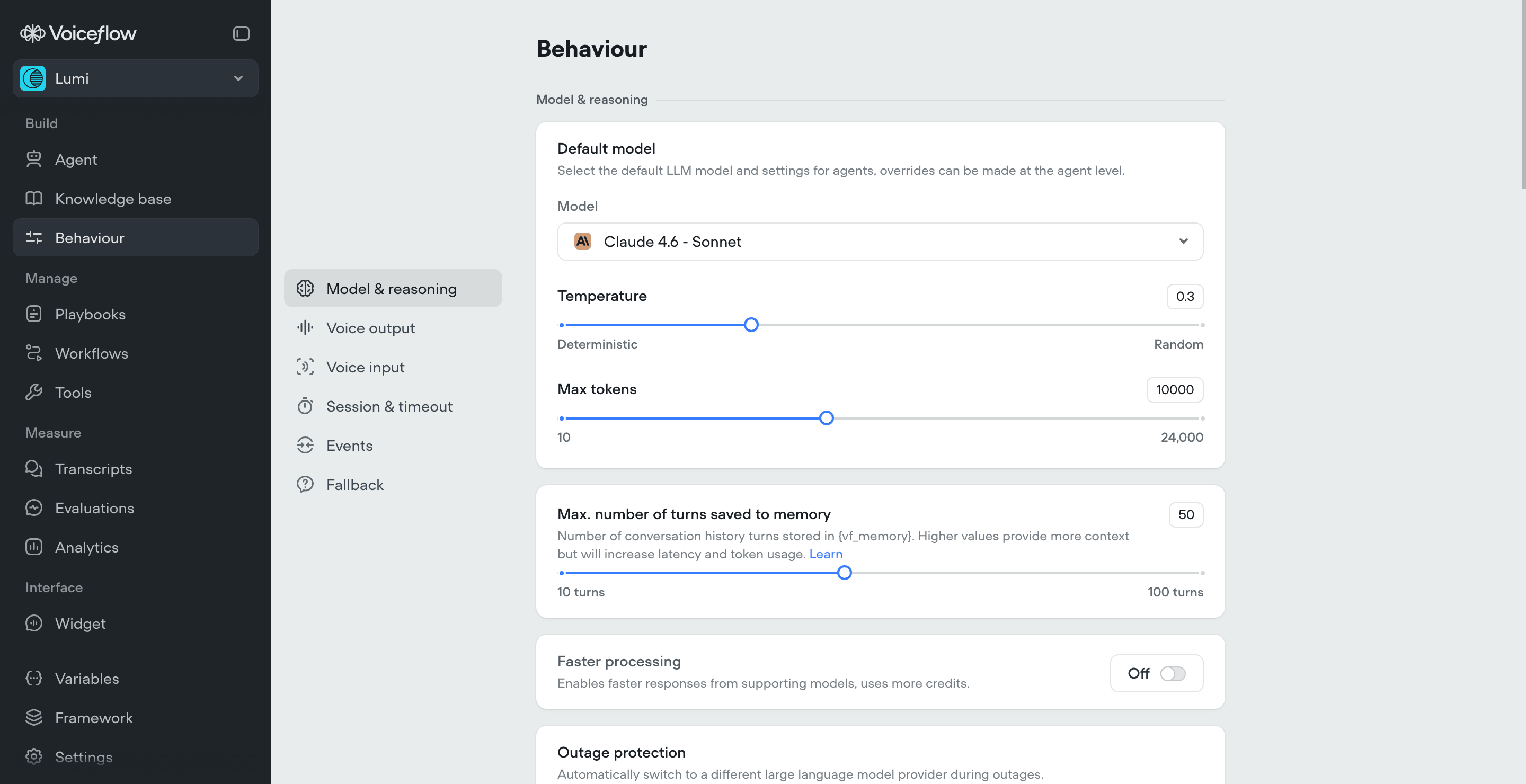
Events (Now Under Behavior Menu)
Events moved to a new Behavior menu with three modes:
- Continue conversation: updates state, agent keeps doing what it was doing
- Return to agent: hands control back for re-evaluation
- Run workflow: triggers a specific workflow directly
Enterprise & Security
- HIPAA compliance: new certification, alongside SOC 2, GDPR, ISO 27001
- PII redaction: Enterprise plans only
- Flexible deployment: public cloud, VPC, or your own cloud
- SSO/SAML and granular user permissioning
- Multiple environments: development, staging, production
- Real-time collaboration across the full agent-building workflow
Migration Cheat Sheet: V3 to V4
This is the reference table you'll want to bookmark. Every V3 concept mapped to its V4 equivalent.
Core Concepts
| V3 | V4 | Status |
|---|---|---|
| Agent step | Playbooks | 🔄 Changed |
| Components | Workflows | ✏️ Renamed |
| Workflows (intent-based) | Removed entirely | ❌ Removed |
| Intents | Agent routes natively via LLM | ❌ Removed |
| Entities | Agent extracts natively | ❌ Removed |
| NLU engine | LLM-native routing | ❌ Removed |
| Main Agent prompt | Global prompt | ✅ New |
| Instructions | New routing concept | ✅ New |
| Tool step | Separate Integration & MCP steps | 🔄 Changed |
Steps & Building Blocks
| V3 | V4 | Status |
|---|---|---|
| Choice step | Listen step | ✏️ Renamed |
| Capture step | Listen step | ✏️ Renamed |
| Messages (static) | Messages (Scripted workflow) | 🔄 Changed |
| Set step (Prompt) | Operator step (AI conditional) | ✅ New |
| Javascript step | Code step | ✏️ Renamed |
| KB Search step | Removed | ❌ Removed |
| Custom Actions | Removed, migrate to Functions | ❌ Removed |
| Add Trigger | Removed | ❌ Removed |
Brand New in V4
- Playbook step: embed goal-based AI reasoning inside workflows
- Crew step: chain multiple playbooks together
- Operator step: AI-based conditional logic (replaces Set + Condition combos)
- Async configuration: for both Function and API steps
- Native phone number provisioning: no third-party setup
- PII redaction: enterprise security feature
- Source URL display: for Knowledge Base and Web Search system tools
- Full-screen prompt editor: for Global prompts and Instructions
- Behavior menu: Events with three modes (Continue, Return to agent, Run workflow)
Final Thoughts: What V4 Means for the Way We Build Agents
Let's be honest: V4 requires a re-learning process. If you've spent months (or years) mastering V3's intent-based routing, NLU tuning, and workflow-first architecture, a lot of that muscle memory doesn't directly transfer. Intents are gone. Entities are gone. The entire NLU layer is gone. The way you think about structuring an agent is fundamentally different.
That can be frustrating at first. We went through it ourselves during the beta. Patterns we relied on in V3 simply don't exist in V4, and it took real project work to develop new ones.
But here's the thing: V4 is not changing for the sake of changing. It's aligned with where the entire industry is heading. Every major platform, framework, and research lab is moving toward agentic systems where AI doesn't just respond to predefined paths but actually reasons about what to do next. Voiceflow is making that bet now, and from what we've seen building on V4 for the past several months, it's the right one.
What actually gets better
Once you get past the initial learning curve, a few things become obvious:
- You ship faster. Writing playbook instructions in natural language is significantly quicker than designing complex workflow trees with dozens of condition branches. For most use cases, you can get a working agent in a fraction of the time.
- Agents are more resilient. In V3, an unexpected user message could break your flow if you hadn't accounted for it. In V4, the agent reasons through edge cases on its own. You still need guardrails, but you spend less time trying to predict every possible conversation path.
- The architecture scales better. One agent with modular skills is easier to maintain than a web of interconnected workflows. Adding a new capability means adding a new playbook and a line in your instructions, not rewiring half your project.
- You get more control where it matters. This sounds contradictory, but it's true. Because workflows can now embed playbooks, you get AI reasoning inside deterministic flows. The best of both worlds, rather than having to pick one or the other.
What to watch out for
V4 is still early. A few things worth keeping in mind:
- Prompt engineering becomes the core skill. Your agent is only as good as your global prompt, instructions, and playbook instructions. If you've been relying on visual flow design as your primary tool, you'll need to develop your prompting skills.
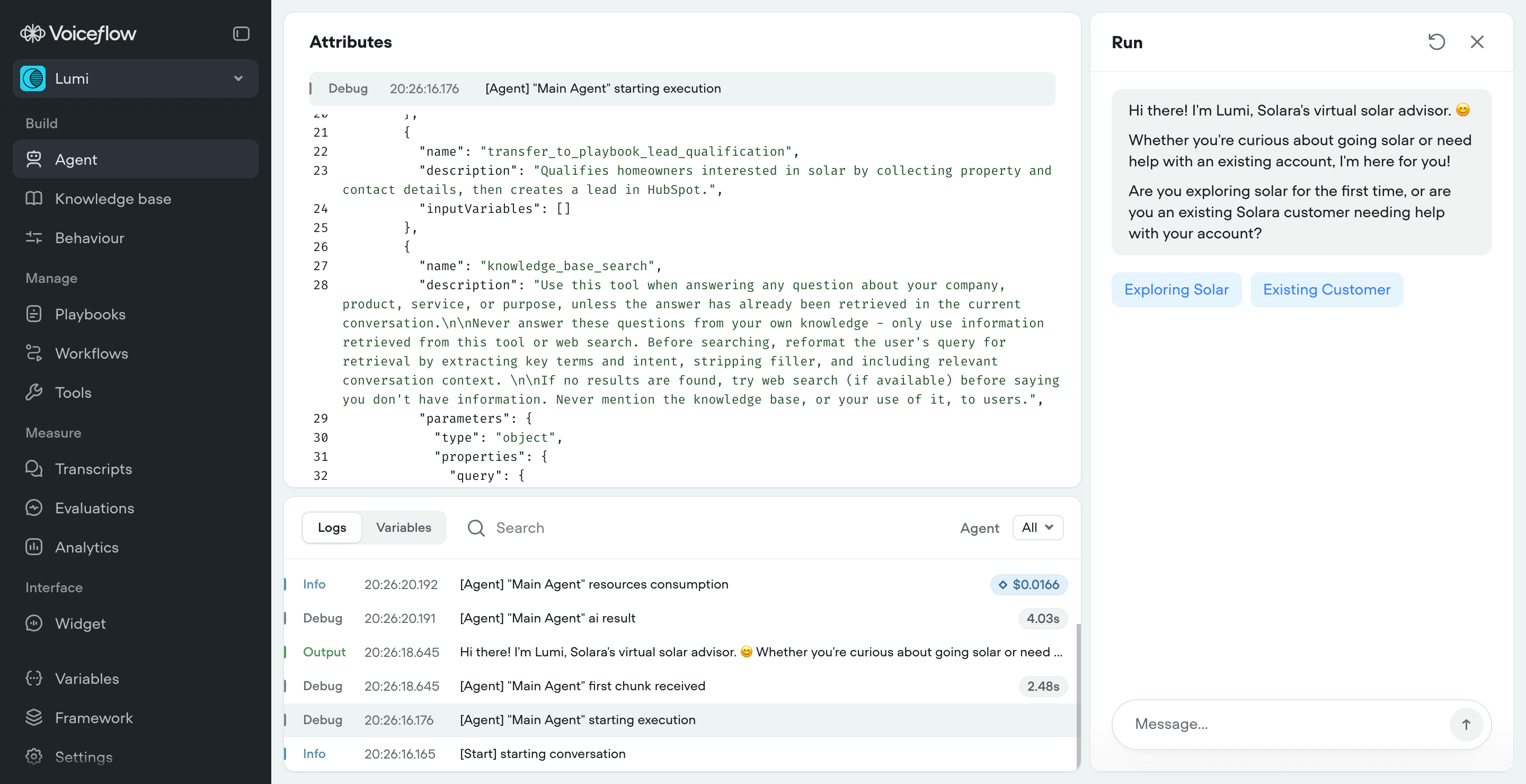
- Debugging is different. In V3, you could trace a conversation step by step through a visual flow. In V4, you're looking at logs, transcript details, and reasoning traces. The observability tools are good, but the debugging workflow takes some getting used to.
- Not everything needs to be agentic. It's tempting to go all-in on playbooks because they're the new shiny thing. But some processes genuinely need deterministic control. A payment flow, a compliance check, identity verification: these are still better as workflows. Use playbooks for reasoning, workflows for rules.
Our take
V4 is the most significant platform update Voiceflow has shipped. It's not just a feature release; it's a new mental model for building AI agents. The learning curve is real, but the ceiling is much higher.
If you're starting fresh, you're in a great position. Learn V4 from the ground up and you won't have to unlearn anything.
If you're migrating from V3, give yourself time. Don't try to replicate your V3 project structure inside V4. Instead, step back and ask: "If I were building this from scratch with an agentic framework, how would I structure it?" The answer is usually simpler than what you had before.
The agentic era is here. V4 is built for it.
About Moonside AI
Moonside is an AI agency specializing in building advanced AI agents for businesses. As part of the Voiceflow Certified Expert program, we help organizations design, implement, and optimize AI-powered customer experiences.
What we do:
- AI agent design, implementation, and hosting (chat, voice, phone)
- Voiceflow V3 to V4 migration
- MCP, custom integrations, and tool development
- Agent optimization and performance tuning
- AI consulting and strategy
- AI audit and automated evaluation
- AI training and workshops for teams
- Agentic workflows and automation development
- Custom AI solutions beyond Voiceflow
- Ongoing support and maintenance
Looking to migrate your V3 agents to V4?
We've been building on V4 since the early beta. Whether you need a full migration, a new agent from scratch, or just a second opinion on your architecture, we can help.
Book a Free Consultation →Join the waitlist to FlowTracker, our in-house built Voiceflow dashboard platform for agencies.
Sign up with our Partner link to get 1 month of free access to Voiceflow Pro plan.
This guide was created by Moonside AI with the help of Claude, from our direct hands-on experience building V3 projects, V4 projects since the early beta access in late-2025, publicly available information about Voiceflow V4, the new official documentation, and launch announcement. Voiceflow is a trademark of Voiceflow Inc. This guide is not officially affiliated with or endorsed by Voiceflow Inc. Claude is a trademark of Anthropic PBC.